

Unpacked when it lands
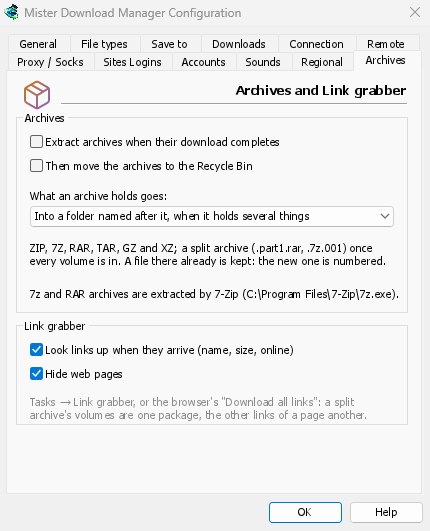
Tick Extract archives when their download completes in Options → Archives (it is off by
default), and every archive is extracted as soon as it is in. Or right-click a finished archive
and choose Extract. A split archive, such as movie.part1.rar and the parts after it, is
extracted once, when its last volume arrives.
The formats you meet
MDM itself extracts ZIP files, AES-encrypted and Deflate64 ones too, TAR, TAR.GZ and TAR.XZ archives, and single GZ and XZ files.
7z and RAR archives need 7-Zip, a free program. MDM uses it when it is installed, for split and encrypted archives too. Options → Archives says whether it was found; when it wasn't, the 7-Zip needed window says so, with a Get 7-Zip button. RAR's own extraction code can't be part of a free program like MDM, which is why it asks 7-Zip.
Careful with your disk
The files go next to the archive, into a folder named after it when it holds several things (or
always, or never: you choose in Options). A file that is already there is kept, and the new one
is numbered: report (1).txt.
A name that would lead outside the folder is left out, and so is a link to somewhere else on the disk. An archive that would write far more than its size, or more than the disk has room for, stops before it fills it. Extracted files are marked as coming from the internet, as the archive is, so Windows still warns before running a program from them. The archive itself goes to the Recycle Bin (the Trash on macOS and Linux) only if you ask.
Packages that know their archives
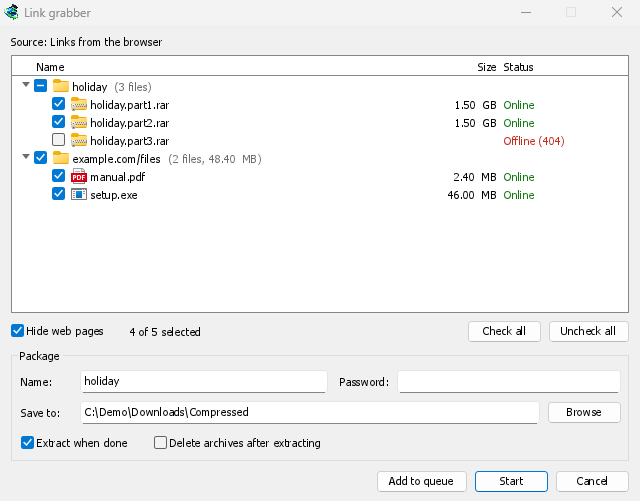
In Link grabber, the volumes of one archive form one package. Each package has its folder, the archives' password, Extract when done (ticked by itself when the package holds an archive) and Delete archives after extracting. The password is kept in memory only, never written to disk.
An encrypted archive without its password opens the Archive password window. Hover over the download in the list to read what happened: how many files were extracted and where, or why not.
Free, open source, no ads, no trial.
Download Mister Download Manager