
If Mister Download Manager closes unexpectedly or stops responding, a crash report window opens. It shows what happened, lets you read the whole report, and can send it to the developers on GitHub. Each report helps fix the problem for everyone.
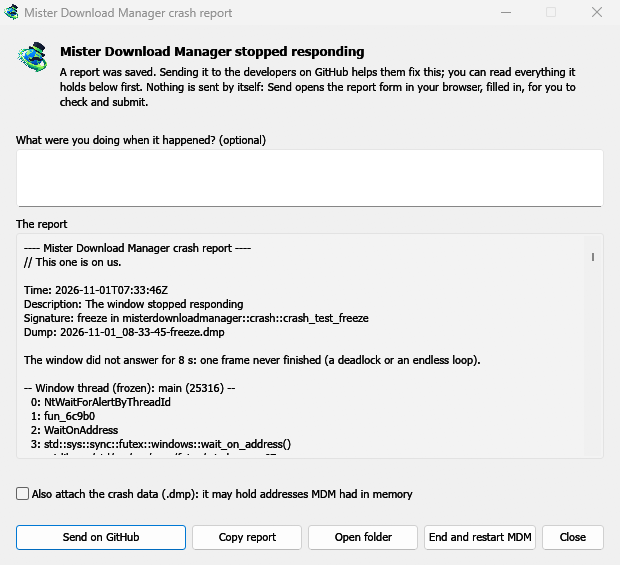
What you see
- Mister Download Manager closed unexpectedly: MDM crashed, or hit an internal error and closed.
- Mister Download Manager stopped responding: its window didn't answer for 8 seconds. MDM is still running, frozen. End and restart MDM closes the frozen copy and starts a new one. If MDM answers again by itself, the window says so.
In the window:
- What were you doing when it happened? is optional. A few words, such as "I opened Add URL", help a lot.
- The report shows everything that would be sent. Read it first if you like.
- Send on GitHub opens GitHub's Crash report form in your browser, already filled in, along with the folder that holds the report. Drag the report's file into the form, check it, and submit. You need a GitHub account. Nothing is sent by itself.
- If someone already reported the same problem, the window says so (Already reported as issue #…). Open the reported issue opens it and puts your report on the clipboard, so you can add it as a comment.
The other buttons copy the report, open its folder, or start MDM again.
What a report contains
- What happened: the error and the place in MDM's code where it happened.
- The stack: the place in MDM's code where it crashed or froze, and what every other part of it was doing.
- MDM's recent log: for example "command AddUrl" or "window opened: add-url".
- The system: MDM's version and how you installed it, your operating system and its version, the processor, the language and theme, and how many downloads and queues you have. These are counts only.
It does not contain:
- your download addresses or file names;
- your user name, which shows as
~in folder paths.
If an error message quotes something you typed, that text is in the report, so read it before sending.
The crash data file (.dmp) is a snapshot of what MDM was running at that moment. It helps the developers most, but it can hold pieces of what MDM had in memory, such as download addresses. It is only attached when you tick Also attach the crash data.
Where reports are kept
In MDM's data folder:
crashes\: each report (.txt) and its crash data (.dmp);logs\: MDM's log (mdm.log, with older ones asmdm.1.logand so on, 2 MB each).
MDM's data folder is %APPDATA%\misterdownloadmanager on Windows, ~/Library/Application Support/misterdownloadmanager on macOS, and ~/.local/share/misterdownloadmanager on Linux. In portable mode it is the data folder next to the program.
The log records what MDM does, so a report can show what led to a problem. To log more detail, start MDM with the environment variable MDM_LOG=debug.
For developers
How it works: a second copy of MDM, the monitor, starts beside it with --crash-monitor. The crash code lives in crates/crash and crates/app/src/crash.rs.
- Catching problems. When MDM crashes (a Windows exception, a signal on Linux, a Mach exception on macOS), panics, or freezes, it asks the monitor for a dump. A freeze is a frame of the window running more than 8 s, seen by a watchdog thread that ignores time spent asleep. The monitor then writes a minidump of every thread from outside, through
minidumperandcrash-handler. A crashed process never writes its own dump, which is how Firefox, Crashpad and Sentry do it too. - Reading the dump. The monitor reads the dump with Mozilla's
rust-minidump. It uses the release's Breakpad symbols when they are found, or the native debug info beside a build from source. The report's Signature (for examplefreeze in misterdownloadmanager::winui::combo_edit) stays the same across reports of one problem, and the window searches existing issues for it. - Symbols. Release builds keep line tables (
debug = "line-tables-only"), but no download includes the debug info. CI turns it intoMisterDownloadManager-<version>-symbols-<platform>.zip(tools/installer/symbols.py, using Mozilla'sdump_syms), published beside the release's other files. The report window fetches the zip for its own version when a stack shows bare addresses. - A
.dmpfrom an issue:
cargo run -p mdm-crash --bin mdm-symbolicate -- crash.dmp MisterDownloadManager-<version>-symbols-windows-x64.zip
- Testing it.
cargo test -p mdm-crashruns a real freeze, panic and crash (examples/crashy.rs) and checks each report's signature. To try it in the app, start MDM withMDM_CRASH_TEST=1, then runmisterdownloadmanager /show crash-test:freeze(orpanic,crash,abort).
Free, open source, no ads, no trial.
Download Mister Download Manager