
Set up the extension once, and every download link you click in Chrome, Edge or Brave goes to MDM. (Firefox works too, but its support is still being tested.)
Before you start
MDM must be installed with the setup, with Set up browser integration (Chrome, Edge, Brave, Firefox) ticked. It is ticked by default. If you're not sure, run the setup again. A portable copy can't do this.
Steps
- Open your browser's extensions page: type
chrome://extensions,edge://extensionsorbrave://extensionsin the address bar. - Turn on Developer mode.
- Click Load unpacked.
- Choose the
extension\chromiumfolder inside MDM's folder. If you installed MDM for yourself, that is%LOCALAPPDATA%\Programs\Mister Download Manager\extension\chromium; you can paste that path into the folder box. - Mister Download Manager Integration Module appears. Make sure it is turned on.
- Go to a web page and click a download link, for example a ZIP or an EXE.
- MDM opens Download File Info instead of the browser downloading the file. Click Start Download.
You don't need to start MDM first: if it isn't running, it starts by itself.
Choose what MDM takes
- Which file types: Options → File types → Automatically start downloading the following file types. Add or remove types, separated by spaces.
- Sites to leave alone: Options → File types → Don't start downloading automatically from the following sites. Add the site's name, for example
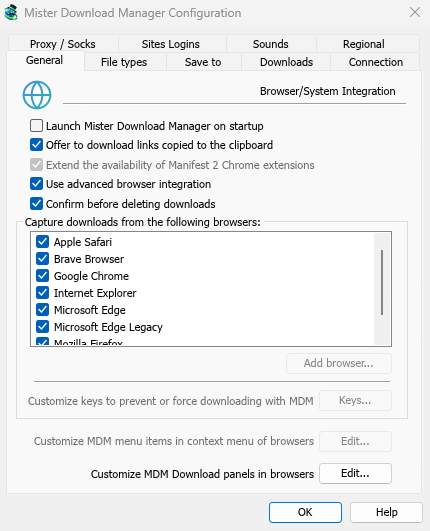
downloads.example.comor*.example.com. - One browser only: Options → General → Capture downloads from the following browsers. Untick the ones MDM should leave alone.
Everything MDM doesn't take stays with the browser.
Download a link the browser would open
Some links, such as a PDF or a video file, open in the browser instead of downloading, so there is nothing for MDM to catch. Right-click the link and choose Download with Mister Download Manager. The address must still end in one of the listed file types.
Next steps
- Browser integration in detail (Firefox, private windows, what is sent) →
- If the browser doesn't hand downloads over →
- Download overnight →
Free, open source, no ads, no trial.
Download Mister Download Manager