
A download that stopped halfway doesn't have to start over. MDM keeps what it has and continues from there.
After a cut connection
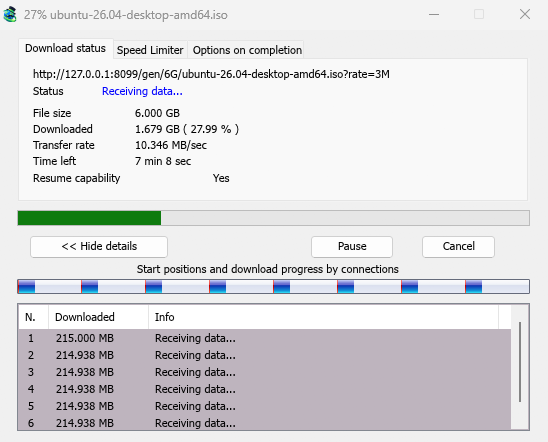
When the connection drops, MDM retries on its own. In the progress window, the connection table shows Retrying and the reason. Usually the download goes on by itself once the connection is back.
If it gives up and shows Error:
- Select the download in the list.
- Click Resume on the toolbar (or right-click → Resume Download).
After a crash or a restart
MDM saves each download's progress as it goes, so a Windows crash, a power cut or closing MDM loses at most the last moments.
- Start MDM. The download is in the list under Unfinished.
- Select it and click Resume.
When the link has expired
Many sites hand out links that only work for a while, or only while you are signed in. Resuming then fails, because the old address no longer answers.
- Right-click the download and choose Refresh download address.
- MDM opens the web page the link came from (when it knows it), and the download's File Properties.
- On the web page, start the download again, or copy the new download link (right-click → Copy link). If the browser hands the new download to MDM, cancel it there: you only need the address.
- Paste the new link into Address in File Properties and click OK.
- Click Resume. The download continues from where it stopped, using the new address.
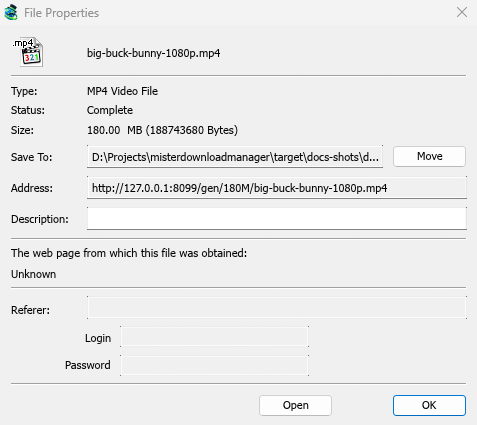
The new address has to point at the same file. If it doesn't, MDM stops with the file changed on the server.
When the file changed on the server
If the site replaced the file with a new version, the parts MDM has don't fit any more. Right-click the download and choose Redownload to start again from the beginning. A finished file is only replaced when the new download completes.
When resuming isn't possible
Look at Resume capability in the progress window. No means the server can't send a file in parts. MDM then uses one connection, and a download that stops has to start over. For such servers, avoid stopping the download, and avoid a very low speed limit, which can make the server drop the connection.
Next steps
Free, open source, no ads, no trial.
Download Mister Download Manager