

The proxy you already use
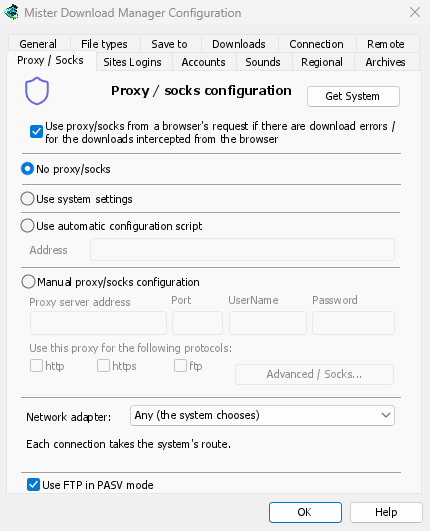
No proxy/socks connects directly; it is the default. Use system settings takes the proxy
set in Windows. Manual proxy/socks configuration takes the proxy's address and Port, a
UserName and Password if it needs them, and the protocols it is for. Write a SOCKS proxy
as socks5://host. Get System fills the fields in from Windows' settings, to adjust from
there.
If your network gives a proxy auto-config (PAC) script, type its address, or pick the file,
under Use automatic configuration script. MDM fetches it and asks it which way each download
goes (PROXY, SOCKS or DIRECT), as browsers do. Until it has been fetched, or if it can't be,
MDM uses the system's settings.
FTP never goes through the proxy, so the proxy's ftp box stays greyed.
The browser's VPN extension, followed
With Use proxy/socks from a browser's request (on by default), a download MDM takes from the browser goes through the proxy the browser used for it: a VPN or proxy extension's, the browser's own manual proxy, or its auto-config script. Content limited to the VPN's country keeps working. In Firefox, switch on Send downloads through this browser's proxy or VPN extension in the extension's popup. Chrome, Edge, Brave, Opera and Vivaldi can't hand the proxy over yet: set the same proxy in MDM there. A proxy that needs the VPN extension's own login can't be shared, and the download says so rather than going without it.
The proxy's password moves to the system's keychain: Windows Credential Manager, the keyring on Linux, the macOS keychain.
Choose who looks up names
Options → Connection → DNS picks who turns names into addresses for downloads, FTP, MDM's own downloads and the update check: the system's (the default), Cloudflare, Google, Quad9, AdGuard, NextDNS with your configuration ID, or your own. It is asked over HTTPS (the default) or TLS, so nobody on the way sees or changes the names you look up, or plainly over TCP. Test shows how long it takes to answer.
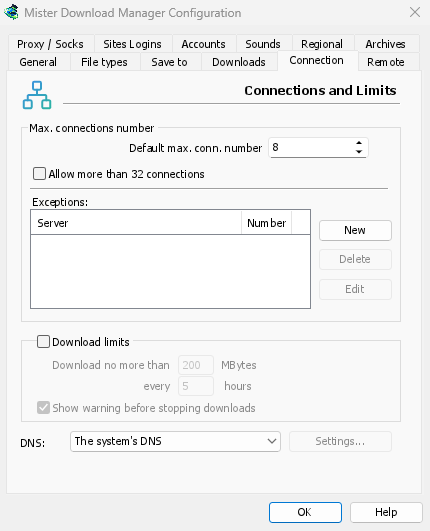
If the DNS can't be reached, the download stops with a message naming it, unless you allow
falling back to the system's DNS. Your hosts file and local names stay with the system's DNS,
and video pages and torrent trackers still use it. The command line's get takes --dns.
One adapter for everything
To hold every connection to your VPN, with a kill switch when it drops, see Network adapter.
Free, open source, no ads, no trial.
Download Mister Download Manager