

A kill switch built in
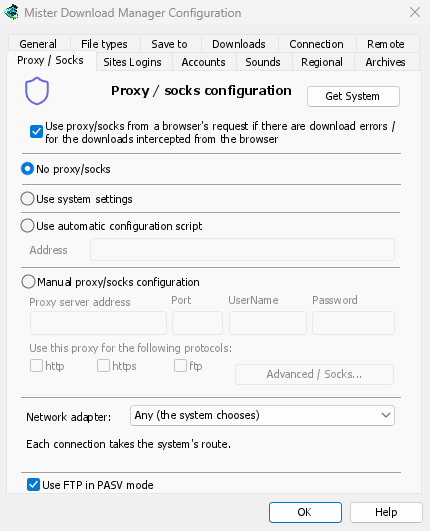
Any (the system chooses) is the default. Choose an adapter instead, and MDM sends its connections through that one only. When it disconnects, or the VPN is switched off, nothing goes out another way. Running downloads stop with "… is not connected" and start again by themselves when the adapter is back. The line under the list shows the adapter's address, or that it isn't connected.
Everything MDM opens
It covers downloads and FTP, torrents (peers, trackers, the DHT and the listening port), video
pages and image galleries, the DNS you chose, MDM's own downloads and its update check. The
command line's get, video-get and gallery-get take --adapter, with the adapter's name,
such as Ethernet or wg0, or one of its addresses.
yt-dlp, gallery-dl and ffmpeg can't be held to an adapter themselves. While one is chosen, MDM gives them a proxy of its own on this computer, with a password only they get, and opens their connections through the adapter as it opens its own. Video formats that can't go through a proxy (RTMP, RTSP, MMS, FTP) are refused rather than sent around it.
How it holds
On Windows, MDM binds the adapter's own address, and Windows then sends those packets only through that adapter. Linux binds the device itself (Linux 5.7 or newer), and macOS binds the interface. An address of a kind the adapter doesn't have, such as IPv6 on a VPN that has only IPv4, is refused, not sent around it.
Keep your lookups inside too
The system's DNS looks names up its own way, and Windows may ask over every adapter. To keep the names inside the VPN as well, choose a DNS in Options → Connection → DNS: MDM then asks it through the adapter. See DNS and proxies.
What it doesn't hold yet
ftps:// addresses (implicit TLS) don't start while an adapter is chosen; ftp:// with TLS is
fine. Connections to this computer itself aren't bound, so a proxy running on this computer
decides where your downloads go from there. On macOS, a VPN that reconnects may come back as a
new interface (utun5 instead of utun4): pick it again.
Free, open source, no ads, no trial.
Download Mister Download Manager