

Links from anywhere
Right-click a page in the browser for Download all links with Mister Download Manager, or
select part of it for Download selected links with Mister Download Manager. The page's referrer and cookies go with each
link. You can also import a text file or an .ef2 export with Tasks → Import, drop a list on
the download list, or open Tasks → Link grabber... and paste any text with Ctrl+V: every
web address in it is added.
A link that is already in your download list goes under Already in the list, unticked.
Sorted into packages
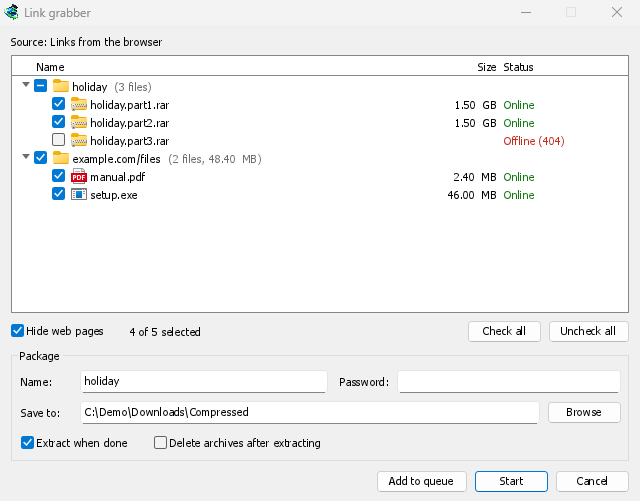
The volumes of one split archive (movie.part1.rar, movie.part2.rar and so on) form one
package, the other links of a page another, and the rest go into Various files. Tick a
package to take all its links. Each package has its own folder, an archive password, and
Extract when done.
Start adds the ticked links to the Main download queue and starts it; Add to queue adds them without starting.
Checked before you download
As links arrive, MDM asks each server about its file, a few at a time. Each link then shows its real name and size, and whether it is Online, Offline (404), Needs a login or Busy, try later. Offline links come unticked, so you don't queue what isn't there. Links to web pages are hidden by default.
Some file hosts count a look-up as a download: turn the look-ups off in Options → Archives.
Archives unpacked when they arrive
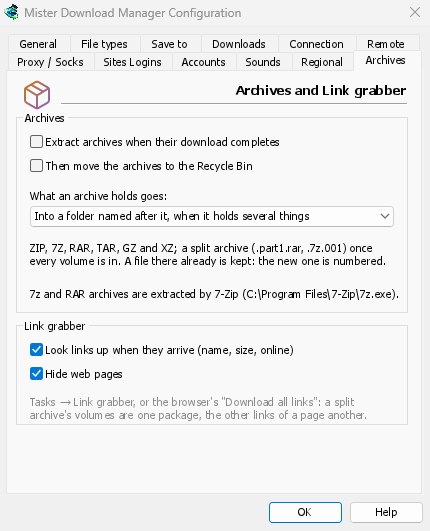
MDM extracts ZIP (encrypted ones too), TAR, TAR.GZ, TAR.XZ, GZ and XZ itself. 7z and RAR need 7-Zip, a free program: RAR's own extraction code can't be part of a free program like MDM. When 7-Zip isn't installed, a window says so, with a button to get it.
A split archive is extracted once its last volume is in. Extraction is careful: a name that would lead outside the folder is left out, an archive that would fill the disk stops first, and an existing file is never overwritten. The archive itself goes to the Recycle Bin only when you ask.
Free, open source, no ads, no trial.
Download Mister Download Manager